Download
Get immut for your Mac
Free to download. Your first 3 investors are free. Set up takes a few minutes, and every step is shown below.
For macOS 12 or later
Why your Mac asks about immut. immut is new, and macOS asks you to confirm an app it has not checked yet. You confirm once, in the steps below, and it opens normally after that. What immut reads stays on your Mac, unless you choose to share it. Your tool keys stay in your Mac’s keychain.
Open it the first time
Five steps, once. After that immut opens like any other app.
Drag immut into Applications
Open immut.dmg from your Downloads. A window opens. Drag immut onto the Applications folder beside it.
If Safari asks whether to allow downloads from immut, click Allow.
immutApplicationsOpen it, then click Done
Open immut from Applications. The first time, macOS says it cannot check the app. Click Done, not Move to Trash.
“immut” Not OpenedApple could not verify “immut” is free of malware that may harm your Mac or compromise your privacy.DoneMove to TrashClick Open Anyway in Settings
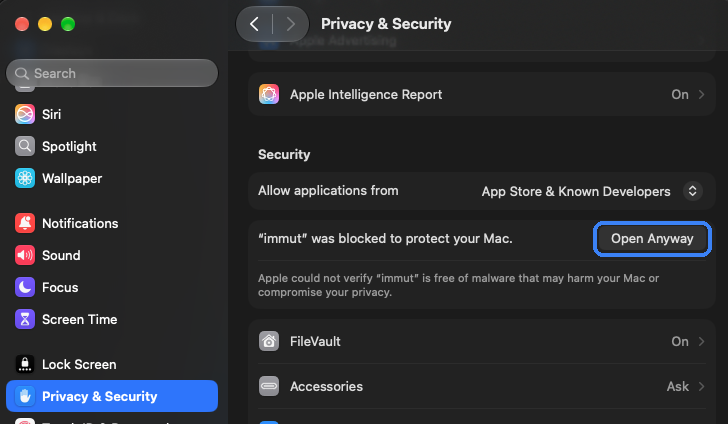
Open System Settings, then Privacy & Security. Scroll down to Security and click Open Anyway next to immut.
Confirm with your Mac's password
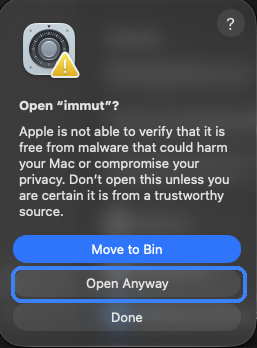
macOS asks once more. Click Open Anyway, then type the password you use to log in to this Mac, or use Touch ID. It is your Mac’s password, not one for immut.
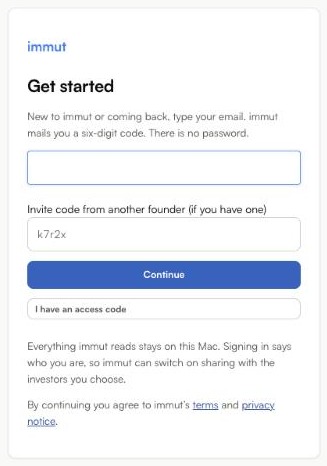
Sign in with your email
Type your email. immut sends you a six-digit code. There is no password. You only do all of this once.