immut, a free DocSend alternative
immut is a free DocSend alternative for founders: share your pitch deck with every investor on its free tier. As of 27 November 2026, DocSend has no free plan and starts at $10 a user a month. immut also shows who read each slide, and on a paid plan it answers each investor's questions under your slides.
By the immut team. Updated . DocSend’s facts checked on its own pages on 27 November 2026.
| immut | DocSend | |
|---|---|---|
| How an investor gets an answer | At onceThey ask under your slide | By emailNo place to ask in the deck, so they email you2 |
| What you see | Every questionWho opened, time on each slide, what they asked | Every pageWho opened, each page, time spent2 |
| Free plan | $0A free tier, no share limit | NoneA 14-day trial, then $10 a user a month1 |
| NDA and watermarks | NoOn purpose: an NDA puts investors off replying | YesOn Advanced, $150 a month1 |
Which one should you pick?
Pick DocSend for NDAs, watermarks and many files. Pick immut when investors keep asking questions your deck does not answer.
DocSend is better if
You send many files and want an NDA or an email check before they open.
You want watermarks and screenshot protection.
You want the deck link many investors already know.
immut is better if
Investors keep emailing about revenue, customers or cash.
You want each investor answered at once, only from your deck and your own answers.
You want investors to have a place built for them: they ask, set alerts and message you, on any device.
You want to send your deck to as many investors as you like, on a free tier.
You want to see more than page views: the time on each slide, how often they came back, and every question they asked.
Do DocSend and immut have free plans?
immut does, and DocSend does not. immut has a free tier: share your deck with as many investors as you like and see who read each slide. AI answers come with a 14-day trial or a paid plan. DocSend has a 14-day free trial, then plans start at $10 a user a month.
| immut Free | immut paid | DocSend | |
|---|---|---|---|
| Price | $0, a free tier | From $49 a month, in three plans | From $10 a user a month, paid yearly1 |
| Free trial | No | 14 days of Starter with 200 AI answers (card needed) | 14 days of its top plan1 |
| Investors you can share with | No limit, each with their own link | No limit, each with their own link | No limit on paid plans; limited on the trial1 |
| Who opened, when, and the time on each slide | Yes | Yes | Yes, per document1 |
| An email when an investor opens your deck | Yes, the first time | Yes, the first time | Yes, every time1 |
| Investors' questions | Saved, and you see how many they ask | Answered at once by immut, and you read every one and can reply | No place to ask in the deck, so they email you2 |
| AI answers to investors | No | 1,500, 4,000, 10,000 a month. 1,000 more for $15 | Not on its pages2 |
| Investors message you and set alerts | No | Yes | Not on its pages2 |
| NDA, watermarks, screenshot protection | No | No | On Advanced, $150 a month1 |
immut’s plans from immut.io/pricing. DocSend’s from its own pricing page, checked on 27 November 2026.
What happens when an investor asks a question?
An investor reads your deck and wants your monthly revenue before booking a call. Here is the same job, both ways.
With DocSend
- They open the link and read the deck.
- The deck has no place to ask, so they email you.
- You see the visit, read the email and write back.
Answered when you reply.
With immut
- They open their own link and read the deck.
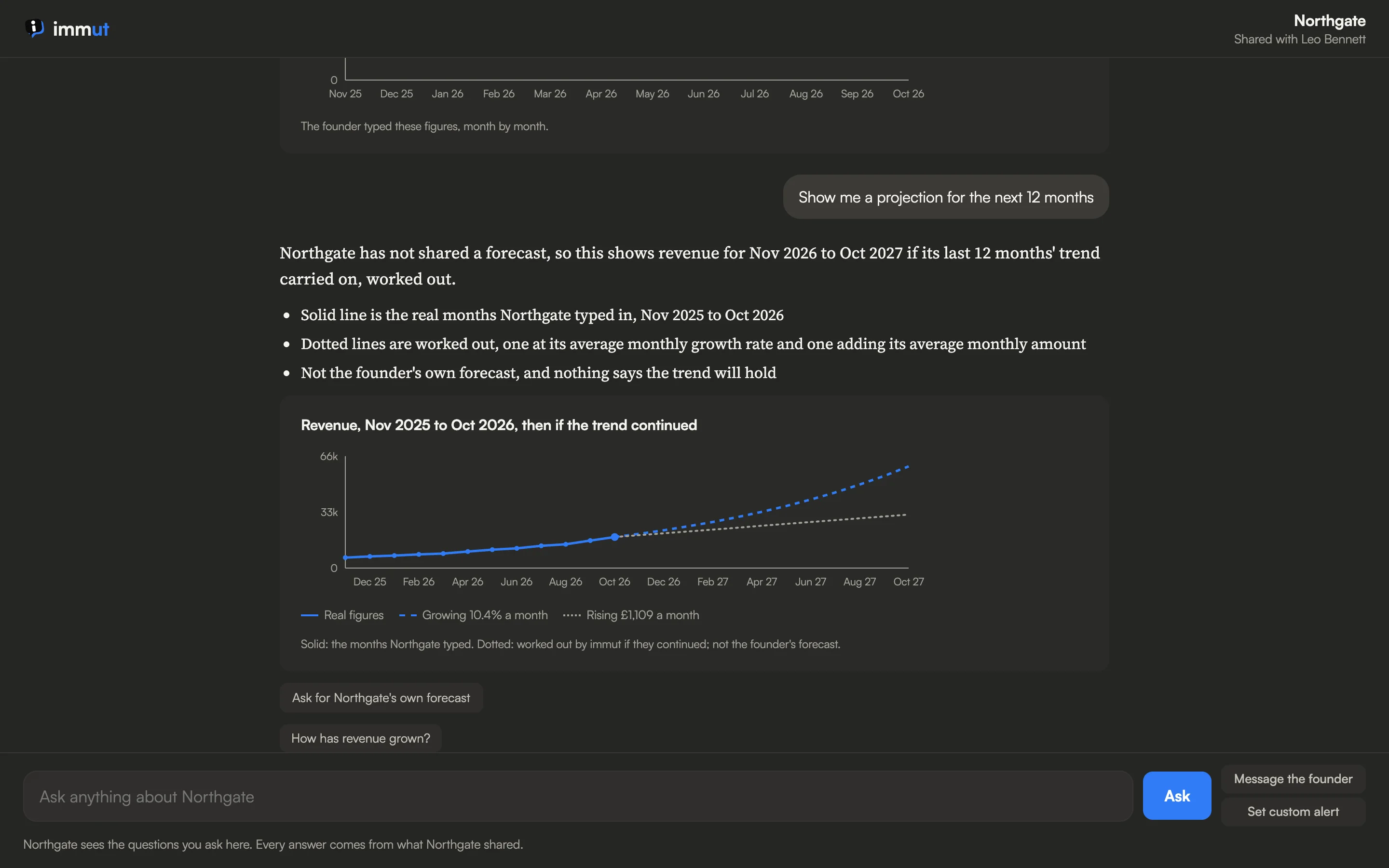
- Under the slide, they ask “What is your monthly revenue?”
- immut answers from your own answer, with a chart.
Answered at once. You see the question too.
Why choose immut over DocSend?
Choose immut if you want investors answered at once, every question in front of you, and a free tier to start. DocSend is ahead on NDAs and watermarks. Every row is below, and every DocSend fact comes from its own pages, with its source number.
| immut | DocSend | |
|---|---|---|
| How easy it is for an investor to open your deck | One link. It opens at once, with no sign-in and no email. | A link with no log-in that can ask for their email before the deck opens, which DocSend recommends. On Advanced it can also check the email with a code.4 |
| How an investor asks a question | Under your slides, in plain English. The answer comes at once. | No place to ask in the deck on its pages, so they email you.2 |
| Where the answers come from | immut's own AI, only from what you put in or checked. | The files you upload.2 |
| Your pitch deck | Drop it in and immut's AI reads every slide. You keep, change or remove each line. | Any file, with page-by-page tracking.2 |
| How fresh the answers are | As fresh as your last change. The same links keep working. | As fresh as your last upload. The same link updates.1 |
| When it cannot answer | It says so, and the question comes to you. | Not on its pages.2 |
| immut | DocSend | |
|---|---|---|
| What you see | Who opened, when, how often, time on each slide, and every question. | Who opened it, each page, and the time spent.2 |
| Alerts | You are told when they first open it. Investors can set their own alerts and message you. | You are told when they open it.1 |
| immut | DocSend | |
|---|---|---|
| NDA before access | No, on purpose. Asking investors to sign first puts many off replying. | On Advanced.1 |
| Watermarks and screenshot protection | A PDF you allow says who it was shared with. | On Advanced.1 |
| Email check before access | No sign-in to look. Investors confirm their email with a code to set alerts or message you. | Can ask for an email on any plan. Checks it with a code on Advanced.4 |
| Switch one person off | Any investor, any time. | Any link, any time.2 |
| Where your data is kept | Online, kept by immut. Deleted when you ask. | In DocSend's cloud.2 |
| Works on | Any browser, on Mac or Windows. Investors use any device. | Any browser.2 |
| immut | DocSend | |
|---|---|---|
| Free plan | Yes, a free tier with no share limit. Answers start with the trial. | No, a 14-day trial.1 |
| Paid plans | From $49 a month, in three plans. | $10 to $180 a month, paid yearly.1 |
Create a free immut agentic pitch deck
Drop in your pitch deck and immut reads it. There is nothing to install, and you sign in with just your email.
Do more with immut
immut's free tier lets you share your deck with as many investors as you like, and to see who read each slide. Paid plans add answers: immut's own AI answers each investor under your slides, only from what you put in or checked.
Here are some of the things you can do with immut:
Answers under every slide
Investors ask in plain English and get an answer at once, only from what you put in or checked.
Every question, on its slide
See what each investor asked, and on which slide they asked it.
Time on each slide
Who opened your deck, when, how often, and how long they spent on each slide.
Add what they asked for
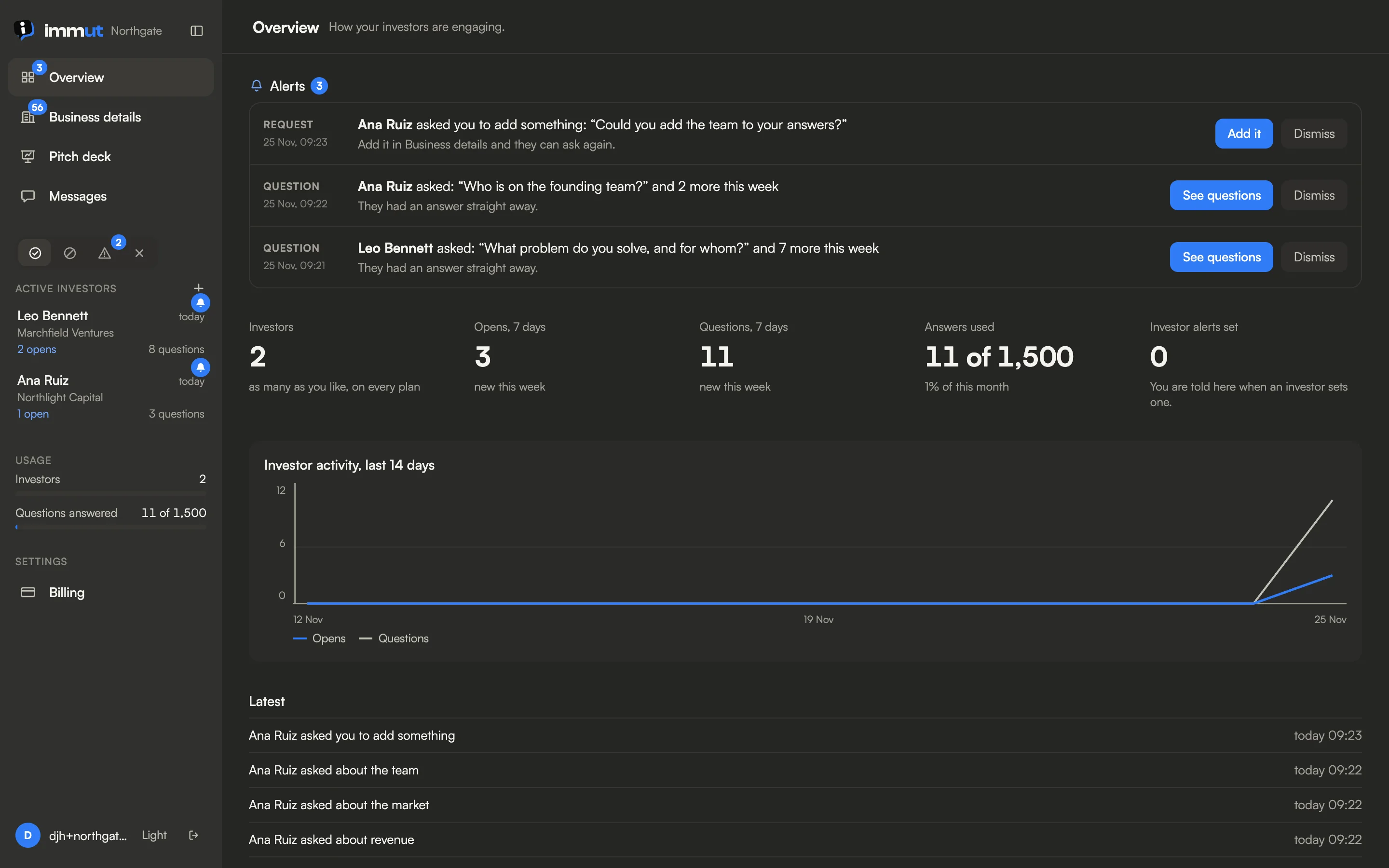
If immut cannot answer, the question comes to you. Add the answer and they can ask again.
Investor custom alerts
Investors set their own alerts and hear when you add what they care about. They can message you from their link too.
End access any time
Switch any investor off whenever you like. Their link stops working at once.
Can I ask my own AI to compare them?
Yes. Copy this into ChatGPT, Claude or Grok. It interviews you about your raise, one question at a time, then reads both sites and tells you which fits.
I am a founder choosing how to send my pitch deck: immut (https://www.immut.io) or DocSend (https://www.docsend.com).

Interview me first. Ask the questions below one at a time. Wait for my reply before the next, and ask a short follow-up if my answer is vague. Do not give any view until we have finished.

1. What does your company sell, and who buys it?
2. Which round are you raising, how much, and by when?
3. How many investors will get your deck this month?
4. What happens after you send it today: replies, silence or follow-up questions?
5. Which three questions do investors ask you most?
6. Do any investors need to sign an NDA, or do you need watermarks?
7. Do you send other files besides the deck?
8. How many people on your team will send links, and what can you spend each month?

Then use this comparison as your starting point: https://www.immut.io/compare/immut-a-free-docsend-alternative (plain text: https://www.immut.io/compare/immut-a-free-docsend-alternative.md). immut wrote it, so do not take it on trust. Check every fact you use against immut.io and docsend.com, including both pricing pages, and tell me anything that is wrong or out of date. Show a table that scores each tool against my answers, with the page each fact came from. Work out my yearly cost on both. Say what you could not confirm instead of guessing. End with which one I should use, whether to use both, and the one thing to do this week.
Questions founders ask
Is there a free DocSend alternative for founders?
Yes. immut shares your pitch deck as a link and shows who read each slide, like DocSend, and it has a free tier with no share limit. On a paid plan immut also answers each investor's questions under your slides. DocSend has NDAs, watermarks and screenshot protection, and immut does not.
Will DocSend or immut help me book fundraising meetings faster?
Both show you who read your deck, so you know who to chase. immut also lets each investor ask under your slides and, on a paid plan, get an answer at once, from what you approved. DocSend is the better pick when an investor needs an NDA or watermarks before they read.
Is immut free?
Yes. immut has a free tier, with no share limit, and investors read your deck. AI answers start with a 14-day trial, then $49 a month. DocSend has no free plan, only a 14-day trial.
How much does DocSend cost?
DocSend starts at $10 a user a month paid yearly, as its pricing page showed on 27 November 2026 ($15 billed monthly). Standard is $45 a user a month, Advanced $150 a month for 3 users, and its top plan $180 a month. There is no free plan, only a 14-day trial.
Who owns DocSend?
Dropbox. DocSend's home page says “DocSend from Dropbox”, and its help pages sit in Dropbox's help centre.
Can investors ask DocSend questions in ChatGPT or Claude?
No. DocSend's own pages show its AI connector (on Standard and above) is for the account holder, to look at their own documents and visits, not for investors. With immut, investors ask under your slides and immut's own AI answers at once, only from what you put in or checked.
Can I use DocSend and immut together?
Yes, though many founders will not need both. Use DocSend when you need an NDA or watermarks, and immut for the questions your deck does not answer.
How did we compare them?
immut publishes this page, and immut is one of the two tools compared. To keep it fair, every fact about DocSend comes from DocSend's own website, and each one links to its source below. We read their pricing, feature and help pages on 27 November 2026. We did not test DocSend's paid plans. We re-check prices every month and change the date at the top when we do.
Where do these facts come from?
The numbers beside DocSend’s facts point to these pages, each read on 27 November 2026.
What else does immut compare with?
Each page compares immut with one tool founders use, checked on that tool’s own pages.
Book fundraising
meetings faster.
Share your deck with an investor in under 5 minutes.